Speed up or slow down a video on Mac
Speed a video up or slow it down.
Some clips are better fast — a long screen recording, a how-to, a drive that should be a time-lapse. Others want slowing down, to catch a moment the eye missed. Changing speed re-times the whole clip by a factor, shortening or stretching it. The detail people trip on is the audio: a modest speed change can keep voices sounding natural, while a big one can't.
The free way (if there is one)
iMovie can speed a clip up or slow it down for free, but only inside a timeline project. QuickTime Player has no speed control for exporting a clip.
iMovie changes a clip's speed for free inside a project, which is fine if you're already editing there. Fileknife is for a quick, standalone speed change on a file you already have, with a clear factor and no project to set up.
With Fileknife
Here's the same job in Fileknife, where it stays on your Mac:
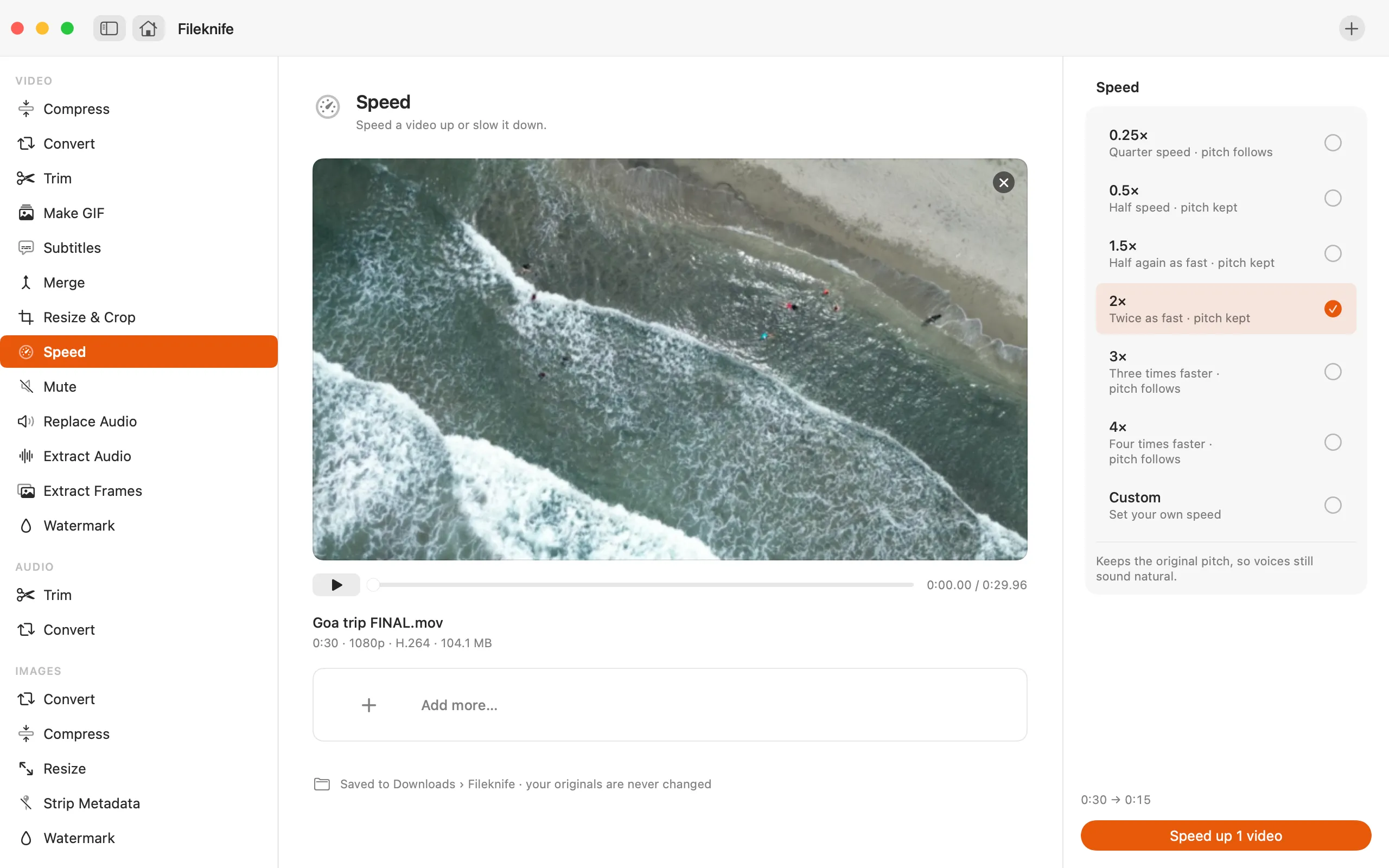
- Drop the video onto Fileknife and choose Speed.
- Pick a preset speed, or set a custom factor between 0.25× and 4×.
- Check the new duration shown for the clip.
- Press the button, then use Show in Finder or drag the result out.
Why reach for Fileknife
- Pick a clear factor — 0.25×, 0.5×, 1.5×, 2×, 3×, 4× or a custom speed.
- Speech keeps its natural pitch between 0.5× and 2×; beyond that the pitch follows the speed, as you'd expect for a time-lapse or extreme slow-mo.
- See the new length before you export.
- Runs on your Mac, with no editor project.
Presets and options
- 0.25×
- 0.5×
- 1.5×
- 2×
- 3×
- 4×
- Custom speed
Takes: MP4, MOV, M4V and most common video formats. Gives: MP4.
Honest limits
Speech keeps its natural pitch only between 0.5× and 2×; outside that range the pitch follows the speed, which is the expected sound for a big time-lapse or extreme slow-motion. Slowing a clip a lot can look less smooth because there are only so many real frames to stretch.
FAQ
Will speeding up the video make the voices sound like chipmunks?
Not within 0.5× to 2× — Fileknife keeps the pitch natural there. Past 2× (or below 0.5×) the pitch follows the speed, which is the normal sound for a heavy time-lapse or extreme slow-mo.
Can I make a time-lapse from a long clip?
Yes. Pick 4× (or a custom higher factor) to compress a long recording into a short, fast clip.
Does it change the audio length too?
Yes. The whole clip, picture and sound, is re-timed together so they stay in sync.
Is anything uploaded?
No. The speed change runs on your Mac.
Be the first to know when it ships · No spam · macOS 14 Sonoma or later