Needs Apple Intelligence: a Mac with Apple silicon, macOS 26 or later, with Apple Intelligence turned on.
Turn a recording into meeting notes on Mac
Turn a meeting recording into clean, structured notes.
An hour of meeting leaves you with an hour of audio and no notes. Writing them up means replaying the recording and typing out what mattered — or paying an AI note-taker that uploads your call to its cloud. Meeting Notes transcribes the recording on your Mac and turns it into structured notes with Apple Intelligence, so a private conversation stays private.
The free way (if there is one)
There isn't a built-in way to do this on macOS today — you'd normally reach for a web tool that uploads your file, or a paid app.
There's no built-in macOS way to turn a recording into notes. The usual route is an AI note-taker that joins or ingests your call in the cloud. Fileknife does the same job on your Mac, from a recording you already have.
With Fileknife
Here's the same job in Fileknife, where it stays on your Mac:
- Drop a meeting recording onto Fileknife and choose Meeting Notes.
- Press Take notes — Fileknife transcribes the audio on your Mac, then writes the notes.
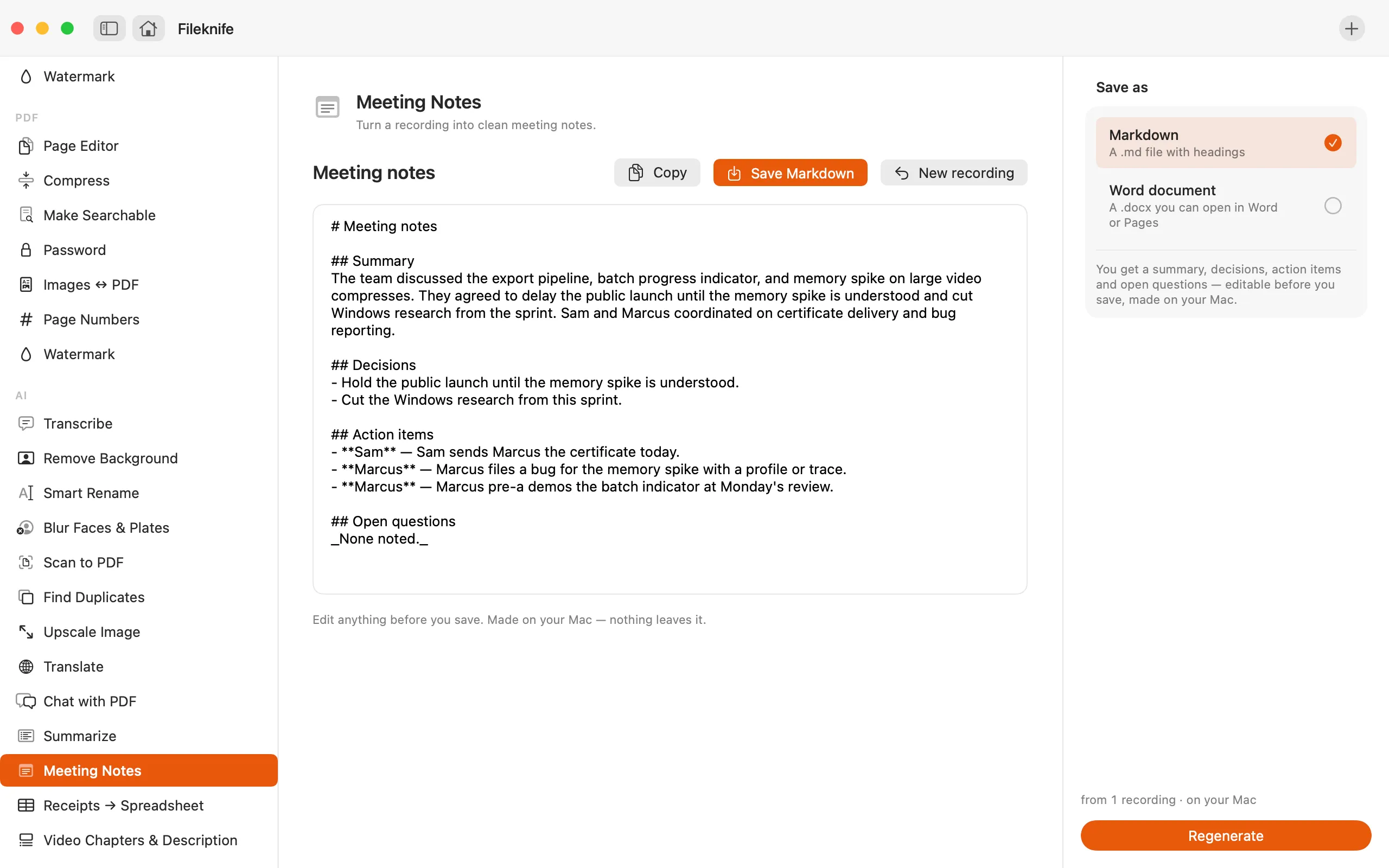
- Read the summary, decisions, action items and open questions, and edit anything that needs it.
- Save as Markdown or a Word (.docx) file.
Why reach for Fileknife
- One recording becomes a summary, the decisions made, action items and open questions — the structure is always the same.
- The recording is transcribed on your Mac first, then the notes are written; nothing is uploaded.
- Long recordings are condensed in sections before the notes are written, so a long meeting still works.
- Every section is editable before you save as Markdown or a Word (.docx) file.
Presets and options
- Summary, decisions, action items, open questions
- Save as Markdown or Word (.docx)
Takes: Audio and video recordings — meetings, calls, voice memos. Gives: Editable notes saved as Markdown (.md) or a Word (.docx) file.
Honest limits
Needs Apple Intelligence — a Mac with Apple silicon on macOS 26 or later, with Apple Intelligence turned on. On a Mac that can't run it, Meeting Notes still appears with a calm note about what it needs, and won't run there. The notes are drawn only from what's in the recording; decisions, owners and tasks are never invented, but a model can still mishear or miss something — every section is editable before you save. A long recording is condensed in sections first, so a very long meeting is summarised, not quoted line by line. Meeting Notes, Video Chapters and Summarize (for recordings) use Apple's on-device speech recognition. macOS downloads its speech files once, the first time you use it. Your audio never leaves your Mac.
FAQ
Is my meeting recording uploaded?
No. The recording is transcribed on your Mac and the notes are written with Apple Intelligence. Nothing leaves your computer.
What's in the notes?
A short summary, the decisions that were made, action items (with an owner where a name was mentioned) and any open questions. A section is left empty when there's nothing to put in it.
Does it make up action items?
No. The notes are drawn only from what's in the recording — decisions, owners and tasks aren't invented. A model can still mishear, so every section is editable before you save.
What can I save the notes as?
Markdown (.md), or a Word (.docx) file you can open in Word or Pages.
What do I need to run it?
A Mac with Apple silicon on macOS 26 or later, with Apple Intelligence turned on. On other Macs the tool still appears with a note about what it needs.
Be the first to know when it ships · No spam · macOS 14 Sonoma or later